


Whether you just ran out of balance mid-call or need to clear your postpaid bill before the due date, Etisalat Quick Pay is the fastest way to get it done — no login, no queue, no hassle. In this guide, you’ll learn exactly how it works, which payment methods are accepted, how to grab the 15% bonus credit, and what to do when something goes wrong.
What Is Etisalat Quick Pay?
Etisalat Quick Pay is a no-login payment tool built into the official e& UAE (formerly Etisalat) platform.It allows you to pay bills or recharge prepaid accounts without having to enter a username or password.

In 2022 Etisalat changed its name to e& (etisalat and), and it remains exactly the same as it was in 2016. This service is referred to as “Etisalat Quick Pay” or “e& Quick Pay”.
It works for:
- Prepaid mobile recharge (Wasel and other plans)
- Postpaid mobile bill payment
- Home internet (eLife) bill payment
- Landline bill payment
- Gifting credit to another Etisalat number
- Data bundle top-ups
One thing worth noting: Quick Pay is not just for your own number. You can use it to pay someone else’s bill or recharge a friend’s prepaid line — just enter their number instead of yours.
How to Use Etisalat Quick Pay — Step by Step
Method 1: Etisalat Website (etisalat.ae/quickpay)
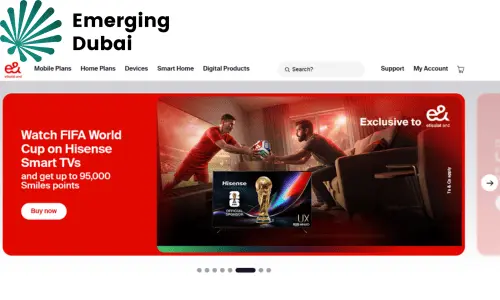
- Open your browser and go to etisalat.ae/quickpay
- Enter the mobile number or account number you want to pay for
- Select the service type (mobile recharge, bill payment, eLife, etc.)
- Choose the amount
- Click Accept & Continue
- Enter your card details and click Pay Now
- You’ll get an SMS confirmation within seconds
Only credit and debit cards issued in the UAE or GCC countries are accepted. International cards from outside the GCC may not go through.
Method 2: e& UAE App
Download e& UAE app from either App Store or Google Play.On the home screen, select Quick Pay & Recharge — you can use it without signing in.. Insert the mobile phone number, select the “amount of the top-up”, pick a payment method and confirm. In addition to this, you can also get exclusive offers for the app only, auto pay setup and usage tracking if you log in.
You can also read: fab bank balance check online
Method 3: Pay via SMS Link
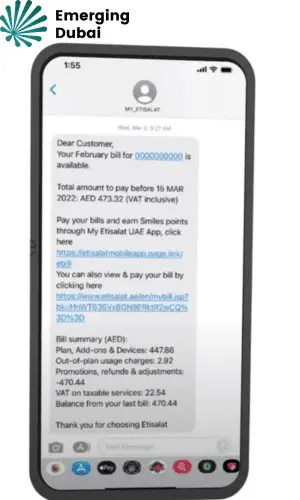
When your postpaid bill is generated, Etisalat sends a payment reminder SMS with a “Pay Now” link. Tap it, enter your card details, and you’re done — your account info is already filled in.
Method 4: Payment Kiosks
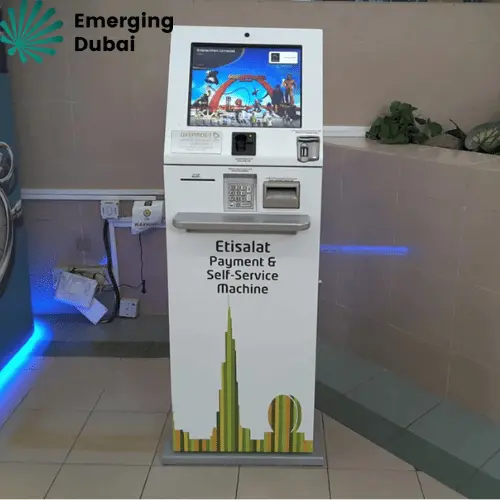
Etisalat has payment machines across all seven emirates — inside malls, DEWA offices, airports, and Etisalat buildings. You can recharge or pay bills with cash or card.
Method 5: ATM
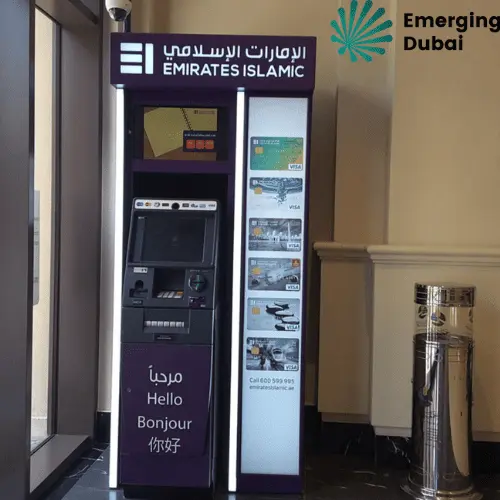
Most major UAE banks — including ENBD, FAB, and DIB — support Etisalat bill payment through their ATMs. Select “Bill Payment,” choose Etisalat, enter your account number, and confirm.
What You Can Pay Through Quick Pay
| Service | Who It’s For |
| Mobile recharge (prepaid) | Wasel customers, Visitor Line, Five SIM |
| Monthly mobile bill | Postpaid plan holders |
| eLife (home internet + TV) | Home broadband customers |
| Landline bill | Fixed-line subscribers |
| Data add-ons | Prepaid and postpaid bundle renewals |
| Gift credit | Any Etisalat prepaid number |
| Business accounts | Corporate or employee lines |
How to Check Your Balance After Recharging
- Prepaid balance: Dial *121# and press send
- Postpaid usage: Dial *140#
- Balance + expiry date: Check via the e& UAE app under “My Account”
You’ll also receive a confirmation SMS after every successful transaction, which serves as your receipt.
Why Use Quick Pay Instead of Logging In?
If you have the app installed and you’re already logged in, great — use that. But Quick Pay fills a very specific gap:
- You’re on someone else’s device
- You forgot your password
- You want to top up a number that isn’t registered in your name
- You need to pay quickly without going through login steps
It’s designed for speed and convenience, not account management. You won’t see your usage history or plan details here — just pay and go.
The 15% Bonus Credit Most People Miss
At the time of recharge (online via website or app) AED 10 or more will automatically get 15% free bonus credit on the recharge amount. No Promo codes required.
So when you recharge AED 50, you’ll get AED 57.50 in usable credit. The rate of the AED 100 recharge is AED 115.
This bonus is only applicable for prepaid recharge and not for recharge through recharge cards / ATMs / third party recharge. Only receive this benefit from the official website or app.
Common Quick Pay Problems — and How to Fix Them
Payment not processing: Ensure that your card is an UAE or GCC issued card. Check card information and be sure to check if online international transactions are enabled. Increase browser privacy or delete browser history.
Balance not updated: Press *121# to recheck the balance (up to one minute delay) Please dial Etisalat customer support at 101 if you do not get a confirmation SMS within 5 minutes.
Wrong number recharged: Call 101 immediately before the credit is used. Etisalat support can sometimes reverse the transaction if the credit hasn’t been spent.
Is Etisalat Quick Pay Safe?
Yes. The Quick Pay portal uses encrypted payment gateways and is PCI-DSS compliant. Your card details are not stored — each transaction is processed securely in real time. For secure payments, use Quick Pay only via the official Etisalat/e& websites or the official e& UAE mobile app. Avoid third-party sites offering unusually high bonus credits — these are often phishing pages.
Quick Reference: Useful Dial Codes
| Action | Code |
| Check prepaid balance | *121# |
| Check postpaid usage | *140# |
| Redeem recharge card | *120*[code]# |
| Transfer credit | *100*[number]*[amount]# |
| Customer support | 101 |
Final Thoughts
Etisalat Quick Pay is one of the most practical digital tools available to UAE residents. It removes every friction point from the bill payment process — no passwords, no queues, no store visits, no fixed hours. Whether you’re a professional paying your own bill, a family member covering someone else’s, or a business manager handling multiple corporate accounts, Quick Pay delivers speed, security, and simplicity in one place.
The key is using it correctly: always verify the number before paying, save your transaction ID, use the official URL, and never share your OTP with anyone.
FAQs
Do I need an account to use Quick Pay?
No. Just enter the mobile or account number and complete the transaction.
Can I pay someone else’s bill?
Yes. Enter their number in the payment field — Quick Pay works for any valid Etisalat number.
Does Quick Pay work outside the UAE?
Yes, you can access it from anywhere, but your card must be UAE or GCC-issued.
What if my transaction fails but my card was charged?
Call 101 immediately with your transaction reference. Etisalat will verify and either complete the recharge or process a refund within a few business days.
Can businesses use Quick Pay for multiple numbers?
Yes. Etisalat Business Quick Pay is available through the e& business portal for bulk bill payments in a single session.
What happens if I enter the wrong number during Quick Pay?
Contact Etisalat support immediately on 101. If the credit has not yet been used by the other number, the team can sometimes reverse the transaction.